
Hello. I'm onevcat (Wei Wang) from the LINE App Development SBU's AI Developer Experience team. Recently, I have been working on tools that bring AI agents into the development and verification loop.
In this article, I will use sim-use, a tool we developed and released as open source, to introduce the technical choices and several design ideas behind making "agent-driven verification" work in mobile development.
If you have used an agent to write code over the last six months, you have probably experienced this loop:
Write a prompt → the agent produces something → you run the app yourself
  → verify / take screenshots / tell the agent what is wrong
  → the agent fixes it → you run it again → take screenshots again …
Agents have already taken over many parts of "writing code." But for UI applications, confirming the correctness of verification is especially hard. An agent can produce a large amount of plausible Swift or Kotlin in minutes, but once it finishes writing, it usually stops at running unit tests at best. It waits for you to run the app, look at it, and explain what is wrong, then makes fixes based on that feedback. This is a rather inefficient way to develop software.
The tool we built for exactly this problem is sim-use. It is a cross-platform CLI that lets agents efficiently and accurately "see the screen, tap elements, and verify results" on iOS and Android. It is already available as open source.
First, I will explain why this problem is worth solving. Then, through five technical decisions, I will walk through some of the internal design and implementation details that are a little interesting but not entirely obvious.
1. Background: The gap between code production and product verification in the agent era
There is a rough but hard-to-ignore view in the industry: the amount of code produced over the next five years will exceed the total amount produced in all previous years combined. Whether or not you believe that exact number, the direction is clear. Agents are rapidly absorbing the "production" side of software development.
But production is only half of the development loop. Code becomes a product only after it has been verified. Traditional verification methods — engineers manually checking behavior, functional tests in CI, QA teams testing before release — were already the most expensive and slowest part of the development process. If upstream code generation becomes 10x faster, the downstream verification bottleneck is amplified by 10x as well.
What makes this even trickier is that in mobile app development, the lack of mature toolchains and the more closed nature of mobile platforms compared with the Web make this problem even larger.
1.1 The almost unfair advantage of frontend agents
If you work on the Web, you have probably felt that agents can close the verification loop reasonably well on the frontend. The reason is simple.
- Agents can directly obtain the DOM with almost no effort. It is structured, traversable, and itself a meaningful tree.
- Browsers have mature automation tools such as Playwright and Puppeteer, with stable selectors.
- Console logs, network requests, and nearly every other signal are available as text.
The DOM is a kind of "natural corpus" for agents. Something like <button id="login"> does not require visual understanding. It is already structured data. After writing code, the agent can run it, click it, and verify it by itself. The loop is very short.
1.2 Mobile as a black box
Once we move to mobile, the situation changes immediately.
- Both iOS and Android are relatively closed environments, and they do not expose a public equivalent of the DOM.
- The two approaches commonly seen today each have their own strengths, but both still leave important needs unmet.
- Screenshots + multimodal models: expensive, slow, limited in recognizing long-tail controls, unstable because tap coordinates are calculated from screenshots and can easily drift, and costly because multimodal calls add up quickly.
- Dumping the UI tree and showing it to the agent: UIAutomator / AccessibilityService / iOS AX APIs can quickly produce tens or even hundreds of KB of raw JSON. Used incorrectly, they can consume a surprising number of tokens, and UI elements are often missing. I will discuss this point in more detail later.
As a result, if an agent cannot clearly see the screen, it cannot verify things by itself. If it cannot verify things by itself, developers are pulled back into the inefficient loop of writing prompts, waiting for output, and manually running the app.
Giving agents the ability to see and operate an app efficiently, accurately, reliably, and quickly almost determines how much of verification agents can take over, and therefore determines the upper bound of speed in real development. We believe this is one of the most worthwhile problems to solve in the coming era of software development. Once this loop starts running, agent development becomes much more real.
This is the problem sim-use is trying to solve.
sim-use is a cross-platform CLI that lets agents operate iOS simulators and Android emulators / physical devices the way humans do.
It mainly does four things.
- See: translate the app's current screen into a compact, agent-friendly text format that we call
outline. - Tap: through short selectors such as
@Nand#idin the outline, both agents and humans can easily select elements and trigger interactions. - Text input / gestures / screenshots / screen recording / multi-touch / key events: it provides a complete set of commands for operations and evidence capture, along with interfaces for agent auditing and integration with other systems.
- Cross-platform: iOS and Android use the same commands, the same selectors, and the same JSON output format, so the same verification can be reused across platforms.
At a high level, the tool is a Swift-based macOS CLI with a resident daemon for speeding up operations. It drives the two platforms as follows. On iOS, it connects to simulators through Facebook's idb (FBSimulatorControl), obtains the accessibility tree from CoreSimulator's AccessibilityPlatformTranslation for UI observation, and injects HID events for input. On Android, it operates through a bridge APK that runs an AccessibilityService on the device and exposes an HTTP API through adb forward.
A typical usage looks like this:
sim-use ui --device <iOS-UDID-or-Android-emulator>
# Output
App: LINE Dev  402x874

[Top  y<120]
  @6  Button  "Keep memo"  #keepButton
  @7  Button  "Notifications"  #notificationButton
  …

[Content  y=120..754]
  @10  Button  "Sato's profile"
  @12  Image  "Profile image"  #profileView
  …

[Bottom  y>=754]
  @39  RadioButton  "Home"  #homeTab  selected
  @40  RadioButton  "Chats, 22 new items"  #chatTab
  @41  RadioButton  "Shopping"  #commerceTab
  @42  RadioButton  "News"  #newsTab
  @43  RadioButton  "MINI"  #miniTab
In many cases, a screen is compressed to only a few hundred tokens, so the agent can understand its structure almost instantly. It reads the UI as text and then performs actions.
sim-use tap "@10"
sim-use type "hello world"
sim-use swipe --from-x 200 --from-y 800 --to-x 200 --to-y 400
sim-use record-video --output ./demo.mp4
Finally, it calls ui again to obtain the new screen state, make assertions, and decide the next operation. This repeats until the goal is achieved or the necessary verification evidence is collected.
This article is not meant to be a shallow introduction to how to use sim-use. Instead, I want to dig into the technical decisions and implementation details behind it that we thought were worth sharing.
3. Behind the scenes, part one: Outline — a dialect prepared for agents
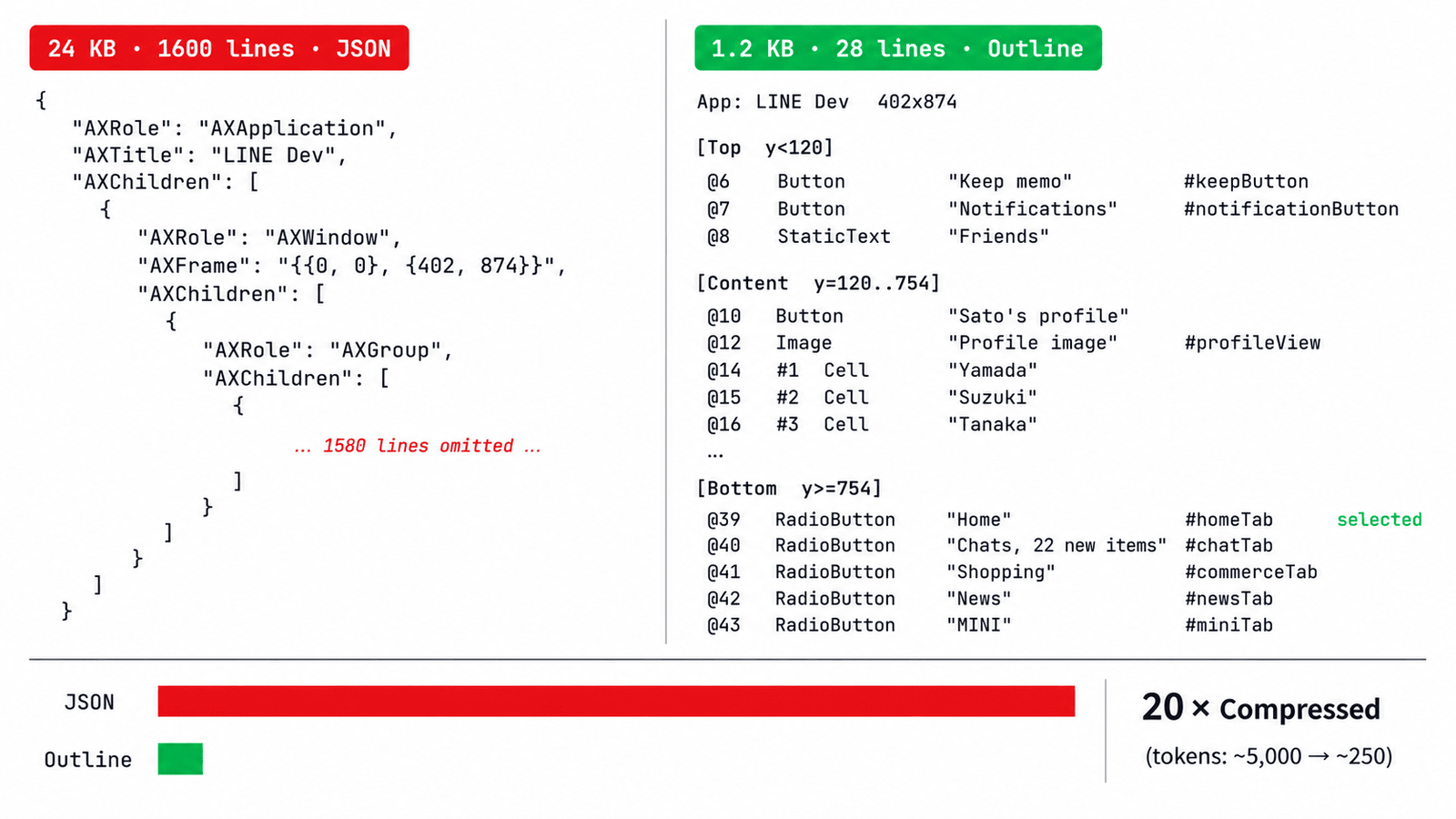
The first thing an agent needs is to "see the screen." The most intuitive approach is to dump the entire accessibility tree as JSON and pass it over. The structure is clear, the contents are complete, and it is easy to parse. We started that way too — until we first tried it on a LINE News page. The result was 24 KB and more than 1,600 lines of pretty-printed JSON.
24 KB is nothing in ordinary engineering, but it is troublesome for agents. In a single verification loop, sim-use ui may be called dozens of times, and its output is mixed into the context each time. After only two or three steps, the context becomes bloated with UI trees, and the noise makes the agent start forgetting earlier parts of the conversation. A smart agent might eventually pipe the output through head or write a script to reshape the data, but that depends on a specific context structure, such as predefined skills, or on the agent's ability to self-correct. Preparing a comfortable working environment for the agent is the key to making it handle problems efficiently.
So at the CLI layer, we created a compact text DSL output called outline. The same LINE News page becomes 1.2 KB and fewer than 30 lines, cutting token consumption to 1/20 of the original. A sample output looks like this:
[Top y<120]
  @1 Button "Back" (24,60 88x44)
  @2 StaticText "News" (152,68 96x28)
[Content y=120..H-120]
  @3 #1 Cell "Top story headline …" (0,120 393x180)
  @4 #2 Cell "Second story …" (0,308 393x180)
  …
[Bottom y≥H-120]
  @9 Button "Tab Home" (0,790 98x44)
3.1 Not just compression — Outline's design principles
Outline is not merely compression. Of course, making JSON smaller is one goal, but the more important goal is making it easy for agents to read. This positioning led to several concrete design choices, all of which survived after we stepped on landmines.
The first, simplest, and most fundamental idea is byte-level stability. All coordinates are rounded with Int(rounded()), and elements are deterministically sorted by (center-y, x), so dumping the same screen twice produces byte-identical output. In other words, agents can directly run text diffs between two dumps. They can immediately see what changed between "before tap" and "after tap," and the small amount of data is very important for fast reasoning.
The second is selector design. As you may have noticed, the ui output provides three kinds of shorthand. @N is the N-th element in the current snapshot. #N means the N-th cell in the page's primary list, for list-based UIs. #<id> directly refers to a stable ID owned by the accessibility tree itself and can be reused across dumps. The original goal of this DSL was to reduce the amount agents have to type. sim-use tap "@5" is much more concise than sim-use tap --label "Login Button" --container "MainView". Surprisingly, though, humans like using it too. When manually debugging a failed case, typing tap @10 while looking at the output is much faster than assembling a long selector string. In human-to-human and human-to-agent communication, this outline also greatly lowers the difficulty of describing a problem.
The third principle is restraint. Outline strictly writes only what the accessibility tree already declares, and does not invent meaning. A group of buttons is just "Button × 5"; it is not arbitrarily named "NavBar" or "CategoryTabs." This discipline comes from one judgment: if an agent sees elements at the bottom, arranged horizontally, all with role RadioButton, it can infer that they are a tab bar. But if the tool names them on its behalf, then when that guess is wrong — for example, if a group of RadioButtons is labeled as SegmentedControl even though its actual behavior is different — the agent is pulled into that mistake. This is one expression of the delicate balance between fixed tools and the intelligence of LLMs. We do not ask the tool to guess. We ask the agent itself to infer and understand the intent of the screen.
The only exception is the three bands at the top of the output: [Top y<120] / [Content] / [Bottom y≥H-120]. These are the only semantic hints we add, because these three bands are stable enough on mobile UIs: status bar, content area, and tab bar. They are low-cost hints that are almost impossible to get wrong.
The last principle is not forcing cross-platform uniformity. On iOS, elements are sorted by (center-y, x). Buttons in a row are often center-aligned even when their heights differ, so sorting by center line is the most stable choice. On Android, however, AccessibilityNodeInfo.bounds includes the container's padding. Sorting by center line can cause parent nodes to be interleaved among child nodes. So on Android, we use (top-y, x) instead. It is a small adjustment, but it makes the outline order more reasonable and better aligned with the visual order of the UI. Cross-platform does not mean forcing the design of one side onto the other. It means leaving room for platform differences.
3.2 Not only seeing, but also pointing — list detection
The #N selector looks simple, but it hides a nontrivial problem: at runtime, how do we identify the page's "primary list"?
The most straightforward approach is to ask the user to specify the container: "this is the chat list," "this is the news feed," and so on. But that violates the premise that agents should not need to know the structure in advance. So we built heuristic automatic detection. It scans the page, finds all clusters of elements that "look like lists," ranks them by confidence, and assigns #N by default to the top-ranked one.
Detection runs along two paths in parallel. One looks at height: groups of sibling nodes with consistent heights, typical of friend lists and table cells. The other looks at spacing: groups of nodes with roughly regular row intervals, typical of news feeds and chat lists where cell heights vary but the layout rhythm is consistent. Then we score them with a simple multiplication: cellCount × consistency × roleBonus × widthBonus. No learning or weight tuning is needed. The highest-scoring cluster wins. When multiple lists coexist — for example, LINE's forwarding destination page has a friend list and a group list at the same time — the second-highest list is also identified and receives selectors such as #N@2.
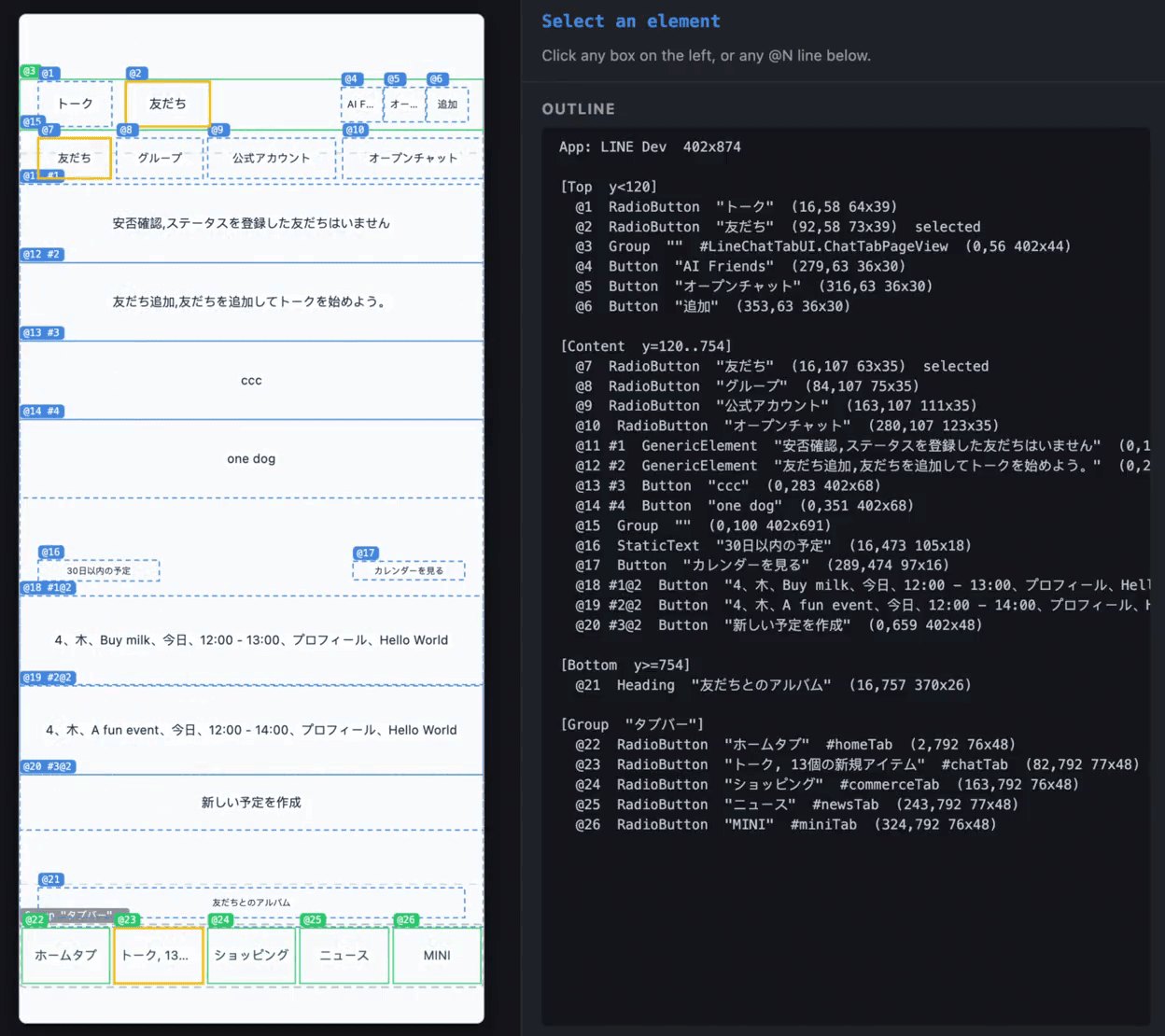
#N, while the group list automatically falls back to #N@2.Demo video: How #N and #N@2 selectors appear when multiple lists coexist
For agents, this means that natural language such as "tap the third row in the chat list" can now map directly to tap #3 without any intermediate visual recognition, reasoning, or coordinate calculation. Verification scripts are no longer tied to hard-coded coordinates that drift across devices or specific labels that drift across languages. What they adapt to is "the primary list presented by the page at runtime," regardless of whether that list has 5 cells or 20 today, and regardless of the concrete labels of the cells. With this kind of selector, E2E tests become far more stable.
4. Behind the scenes, part two: Making invisible elements appear — quadtree probing
There is a painful phenomenon in iOS automation: some node contents cannot be obtained through the AccessibilityPlatformTranslation framework. For example, the accessibilityChildren returned by UITabBar is empty. There are clearly four tab buttons at the bottom of the screen, but when you traverse the accessibility tree, there is nothing under that AXGroup. WebView has similar issues. The same also often happens with iOS 26's "Liquid Glass" design, various custom overlays, and non-standard controls built with SwiftUI.
Even stranger, the API is not completely broken. The same element may be unreachable through accessibilityChildren traversal, yet it can be hit through objectAtPoint:. If you give iOS a coordinate, it can tell you what is there. But if you ask it to enumerate the children inside a container, it ignores them. This behavior has been known for a long time, and many developers have had to live with it.
What we want is a complete accessibility tree. So the problem becomes: how do we use hit-testing to detect elements that normal traversal has trouble reaching?
The simplest idea is dense sampling. Treat the whole frame of a container as a canvas, scatter probe points at small intervals — say every 10 pt — run one hit-test at each point, collect all hit elements, and deduplicate them. Logically, this works. But the cost is unacceptable. Each objectAtPoint: call requires an XPC round trip: from the sim-use process to the simulator process and back. Each one takes several milliseconds. A 400×800 canvas sampled every 10 pt means 3,200 hit-tests, taking tens of seconds, which is not practical.
Because ui is the most important part of the loop, how to place probe points intelligently matters. Our solution is an adaptive quadtree.
A quadtree is an old computational geometry technique. The core idea is to recursively split a two-dimensional region into four parts from the top down, and stop once a condition is met. Games use it for pruning collision detection; map renderers use it to organize tiles. We use a variant adapted specifically for recovering missed elements. First, we lay down one coarse grid over the container frame, with cells of 160×80. At the center of each cell, we call objectAtPoint: once. If an element is hit, we record it and mark its bounding rect as covered. If the cell hits nothing, it is either truly empty or straddling gaps between several small elements, so we split it into four and keep probing. Subdivision has limits. A coarse cell can be split at most 16 times in Phase 1 or 6 times in Phase 2, and it never goes below --min-cell-size (14 pt by default). This prevents us from spending forever on truly empty space.
There is one easy point to misunderstand. After a seed cell hits a small element, the remaining area of that cell is sliced into up to four rectangles — the bands above and below the hit, and the bands to the left and right — and pushed back into the probe queue. In other words, the hit does not cover the entire seed cell; it only covers the hit element's own bounding rect. Its surrounding sibling elements that may have been missed still have a chance to be probed. In the code, this step is called "opportunistic remainder subdivide."
The overall shape is a single tree from coarse to fine. The tree becomes deep where elements are dense and remains shallow where the space is empty. Elements already enumerated by the accessibility tree are treated as "known" and skipped directly, so only regions likely to contain missed elements are probed deeply. In other words, we use expensive XPC hit-tests only where they matter, instead of spreading them evenly over the entire canvas.
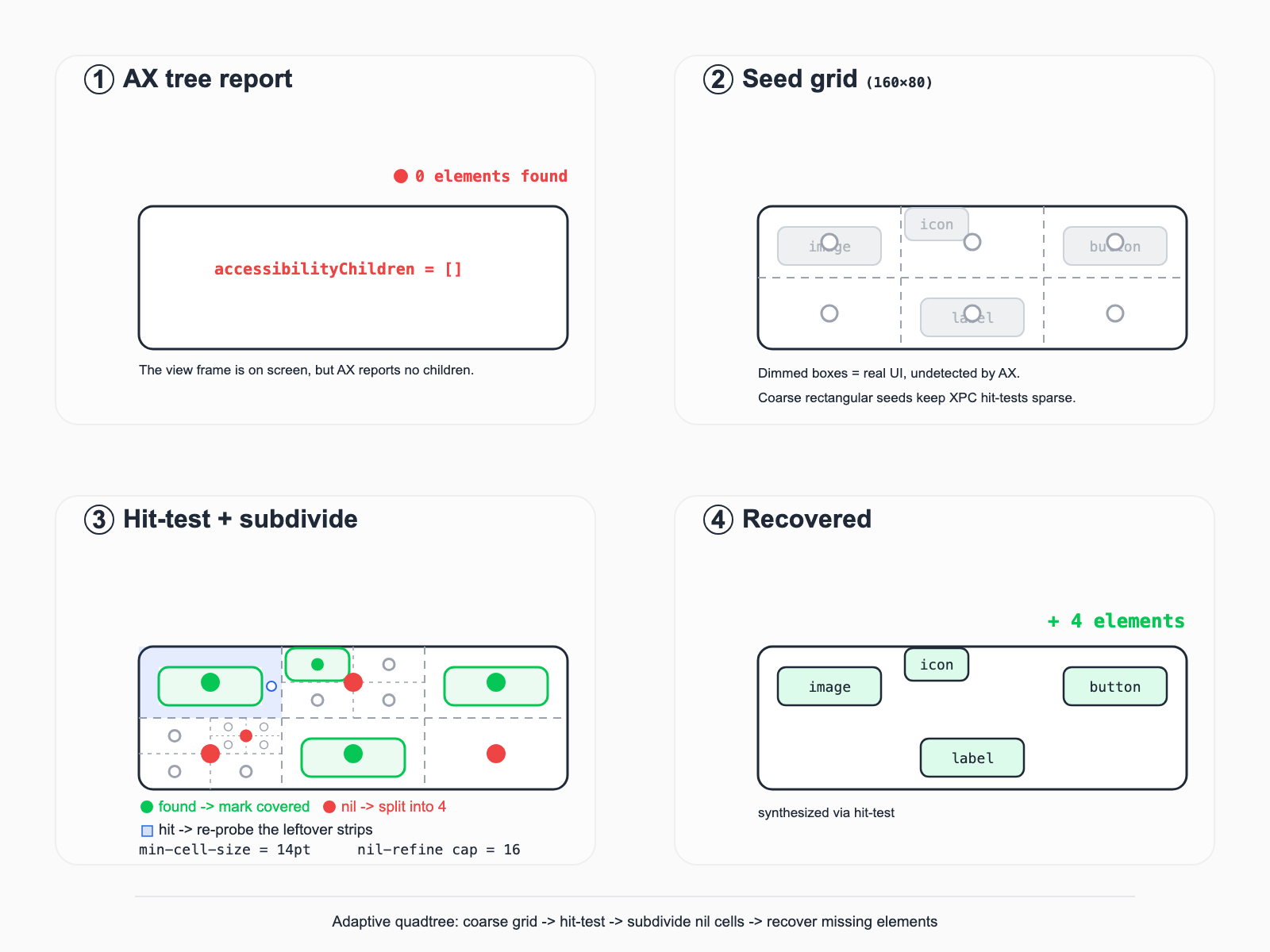
accessibilityChildren is empty, quadtree probing eventually finds all four tab buttons. It starts with a coarse seed grid, marks hits as covered (while returning the remaining bands around the hit to the queue), and subdivides cells that return nil.In real cases, missing elements fall into two broad patterns, handled by two different phases. Phase 1 recovers empty containers. If a parent node has no children but is visually clearly not empty — the typical UITabBar symptom — we pass the whole frame to the quadtree. Phase 2 scans blind spots. This is for parents that have some children but not full coverage. For example, a nav bar may return the back button at the upper left but miss the menu button at the upper right. We subtract every area covered by known elements from the container frame, then run the remaining "blind rectangles" through the quadtree again, only if they are at least 60×60 and have an area of at least 10,000 pt². Phase 2 uses a small geometric trick — horizontal strip slicing + rectangle subtraction — which is much easier to implement than general polygon subtraction and fits mobile UI input distributions very well, because elements are almost always rectangular and mostly arranged horizontally.
To make this abstract algorithm actually work, we added several plain engineering optimizations. The most important one is using rectangular seeds rather than square seeds. Mobile UI elements are almost always wider than they are tall. Nav links, article titles, list rows, and text labels are all horizontal bands. Early on, we used simple square seeds and the efficiency was poor. After changing the initial seed to 160×80, probe count and wall time on LINE News dropped by 20%, and seed cells dropped from 45 to 27. Compared with square seeds of similar area, this reduces total time on a typical complex page by about 30% while maintaining similar probe coverage.
Another optimization is pre-skipping known areas before XPC calls. Since XPC is the expensive part, we should never query cells the accessibility tree already knows about. We maintain a CoveredSet; if the center point of a seed cell is already inside a known element's bounds, with a 2 pt margin, we skip it directly. There is also a parameter that looks unimportant but has real impact: --min-cell-size. We lowered it from 20 to 14 so that SSID icons in the status bar, small badges on the tab bar, and tiny arrows on the right side of settings pages can all be recognized. The cost is that median latency rises from 470 ms to 520 ms (+11%, about 50 ms), but agents often need to tap these small icons, so the extra 50 ms is worth paying.
The final point is deduplication. Early versions of sim-use ui sometimes returned duplicate composite elements in places such as the top nav of a chat detail screen. The cause was that UIKit hides the same container inside multiple sibling AXGroups; when probing under each AXGroup, we hit the same group of real elements. The first deduplication logic worked only within a single probe call, so we had to lift it to the global scope of the entire traversal. We pass a SeenIdentitySet through the whole walk, record an element's identity whenever it is hit, and skip it when it collides again. The final change was only eight lines, but getting there required real-world validation and iteration.
5. Behind the scenes, part three: Removing 200 ms — the daemon architecture
sim-use is a CLI. CLIs are intuitive to use, but they have one hidden cost: each invocation creates a new process, and all heavy initialization must be repeated.
For iOS, this "heaviness" is simulator framework initialization plus accessibility subsystem initialization, which together consistently cost about 200 ms. For Android, it is BridgeClient startup, auth token caching, and adb forward port preparation, about 150 ms in total. Individually, these numbers do not stand out. But agents call sim-use dozens of times in one verification loop, so cold-start overhead quickly becomes a dominant cost.
Our solution is to run one resident process per device. A daemon service listens on a Unix domain socket on the host. When the client executes a command, it talks directly through the socket. The first call fork-execs the daemon and waits for the socket to come up, with a 5-second timeout. All subsequent commands go through the hot path. Every heavy initialization cost is paid only once. After 600 seconds of idleness, the daemon exits automatically and leaves no garbage behind.
The effect is that iOS saves roughly 200 ms on each sim-use ui call — essentially the cold start is paid only once — while Android compresses each invocation from about 150 ms to around 10 ms. Android benefits so much because the BridgeClient path is heavier than ordinary adb commands, making resident mode especially valuable.
This also brings maintenance cost. For example, daemons introduce several correctness problems.
The first problem is binary upgrades while the daemon keeps running old logic. A user may have just run brew upgrade, but the next call still goes to a daemon running old code. Behavior no longer matches, bugs cannot be reproduced, and people start doubting themselves. Our solution is for the client to send _ping before every call, compare the daemon-reported simUseVersion with the current binary version, and if they differ, shut the daemon down and let invoke respawn it. The ping itself costs about 0.4 ms, negligible compared with a roughly 280 ms sim-use ui call.
The second problem is the simulator being shut down without the daemon knowing. The user may run xcrun simctl shutdown, or quit Simulator.app directly. The daemon still holds an FBSimulator handle and crashes on the next command. We made the daemon detect the simulator's state by itself; if it finds the simulator is down, it exits voluntarily and returns a staleSimulator error. There is a small, less visible trick here. iOS emits different low-level error strings depending on the state — shut down, not booted, or booting — and each has different wording. Rather than throwing raw NSError descriptions at the user, we recognize all of them, wrap them into a unified recoverable error, and provide enough information for the agent to decide what to do next, such as trying to restart the simulator automatically.
The third problem is the collision between stdin input and the daemon model. Commands such as sim-use ios type --stdin need to read from the user's terminal, but the daemon's stdin points to /dev/null and cannot read input. The fix is simple: commands can declare a daemonBypass flag, causing them to run directly in-process instead of through the daemon. This is a new kind of trouble introduced by the daemon. Not every command is suitable for the daemon path, and some need an escape hatch.
The daemon problems are quite different from the previous sections. Outline and Quadtree both solve "how to show things clearly to agents," which is closer to product judgment. The daemon is purely a performance problem, but it also illustrates a very common engineering rhythm. Speeding things up is easy; keeping the sped-up system correct under every boundary condition is the part that takes work.
6. Behind the scenes, part four: One command, two worlds — cross-platform design
sim-use initially supported only iOS simulators. Only after the design had become stable on iOS did we start adding the Android backend. iOS goes through FBSimulatorControl; Android goes through the bridge APK + adb forward; their foundations are completely different. But at LINE, iOS and Android engineers routinely collaborate on the same product, so our goal from the beginning was to make the command surface feel like one tool. That way, agents do not need to learn two platform-specific APIs, and many practices for real app development can be shared and accumulated.
The most important design decision is actually very simple: let commands determine the device type by themselves, so neither users nor agents need a --platform argument by default. Identifying the device autonomously is the easiest part. PlatformRouter classifies device identifiers with three rules. iOS simulators use the standard 8-4-4-4-12 UUID format. Android emulators start with emulator-. Android physical devices use ASCII serials, 4 to 32 characters long, and must contain at least one digit.
The first two are natural. The third — requiring a digit — is defensive. If someone mistypes --device foo and we send it down the Android path, adb -s foo will not return an error until it times out after 5 seconds. But if it goes down the iOS path, we can immediately return a clear error. This kind of attention to "how quickly an error makes itself known to a person" is one of the small judgments we often make when writing rules. Agents differ from humans here: the cost of handling one ambiguous error is much higher for an agent. A single failed tool call can trigger an entire LLM reasoning pass and consume thousands of tokens of context. Exposing errors as early and as specifically as possible is a principle worth maintaining when designing CLIs for agents.
After the Android backend reached 1:1 parity with iOS at the command surface, we did something slightly uncommon. We intentionally removed five iOS-only commands from the top-level command surface: key, key-combo, key-sequence, stream-video, and batch. They still exist, but only through sim-use ios <verb>, and they no longer appear in top-level --help. The old commands remain for compatibility, but exit with 64 (EX_USAGE) and include a one-line migration hint.
The reason is simple. Everything listed by sim-use --help should truly work on both platforms. When a user reads tap, type, or swipe, they should be able to confidently write cross-platform scripts without worrying that a command secretly only works on iOS.
This is a somewhat counterintuitive decision. Many projects treat "backward compatibility" as the highest value and let the command surface grow slowly. Adding is easy; removing is hard. In the traditional context of developing and operating software for human users, that was the right thing to do. But the era has changed. If we are designing tools for the way software development now works, being agent-friendly is increasingly important. For tools built for agents, an honest command surface is more important than a stable command surface. Agents do not use tools out of nostalgia for historical names. They simply get caught by commands that appear possible but are not actually possible. Each such command becomes one extra error-handling step, one extra fallback prompt, and one avoidable token expense.
7. Behind the scenes, part five: Adding more fingers — technical verification of multi-touch
We wanted to add a "two-finger pinch" command to sim-use. It did not sound like a huge requirement — pinch, rotate, two-finger long-press. But the development process became the most memorable part for me. The reason is simple: it did not feel much like serious engineering. It was closer to "reverse engineering + experimentation + one-line insight."
The starting point was facebook/idb#514, an issue opened in 2020, with a title roughly asking when idb would support two-finger gestures. Before we touched it, it had been left open for six years. It was not that nobody wanted to solve it. Meta had tried as well, taking the route of "a five-argument call + manually patching packet bytes." It works, but it is fragile. If the SimulatorKit binary changes even once, those hard-coded offsets may become invalid. We wanted a more stable entry point.
The turning point came from a private symbol in SimulatorKit.framework: IndigoHIDMessageForMouseNSEvent. Upstream idb uses its five-argument call form, which is enough for one finger. But when the same symbol is called in a nine-argument form:
IndigoHIDMessageForMouseNSEvent(p0, p1, target, eventType, direction,
                                1.0, 1.0, widthPoints, heightPoints)
it generates a completely different packet structure: a real two-payload Indigo packet, with the state bits of two finger slots correctly initialized. It is not that the five-argument version cannot do multi-touch; it simply never initializes the second finger slot, so iOS only sees one finger. Once switched to the nine-argument version, SimulatorKit itself generates the correct packet structure, with no hard-coded byte offsets at all. The same patch worked unchanged on both iOS 18.6 and iOS 26.2.
But the interesting part started only after wiring this primitive to the top-level command. During technical verification, I thought the hardest part would be "making iOS recognize two fingers." In reality, the hard part was "making iOS recognize the right gesture."
The first finding was that iOS does not count events. I had expected that without many Move events between Down and Up, iOS would not recognize a continuous gesture. But even with steps=1 — one Down, one Move, and one Up — iOS still treated it as a complete drag. What the gesture recognizer looks at is continuity of finger identifiers, not the number of events. This directly simplified the top-level API. We did not need to build different complex event streams for different gestures. One primitive was enough.
The second finding was more interesting. If start and end are set to the same point, it is not a no-op; it becomes one two-finger tap. Maps actually receives it and zooms out by one level. This means pinch, rotate, two-finger tap, and two-finger long-press are essentially specializations of the same multi-touch primitive under different duration values and endpoint geometry. This is also how we finally structured the CLI: one low-level primitive and several presets.
The third finding blocked us for two days. A rotate implemented with linear interpolation shrinks the distance between the two fingers to 71% at 90°, and to 0 at 180°. UIRotationGestureRecognizer sees this continuous change in distance between the fingers and misrecognizes it as a mixed-in pinch gesture. So to rotate correctly, the gesture must be interpolated along an arc. A seemingly harmless geometric simplification — straight line or arc — becomes a binary choice in front of the recognizer.
By this point, the technical verification was mostly complete. Pinch and rotate could stably zoom in/out and rotate on both iOS 18 and iOS 26. But when integrating it into the product, the recognizers trained us two more times.
The first was rotate speed. With the default 270°/0.5s, iOS follows through to around 360° because UIRotationGestureRecognizer has inertia, while Android only follows to about 210° because dispatchGesture is frame-rate limited. Neither is accurate. Fortunately, the comfortable speed range overlaps on both sides: roughly 180°/s. We eventually changed rotate's default duration to adapt based on the rotation angle, keeping angular velocity constant within that range so both recognizers follow cleanly.
The second was --radius. The default value, 80, was 20% of the screen width on the iOS simulator and worked properly. But on an Android emulator wider than 1080 px, it became only 7% of the screen width and silently fell below the rotate threshold of common devices. There was no error message; it simply looked like nothing happened. The fix was one line: max(80, min(w, h) * 0.15). But this is exactly the kind of bug you only notice after running the same tool on two different devices. A single-platform developer can easily ship a tool that appears to work while silently failing on the other platform.
This is different again from the previous points. Outline DSL is a product judgment for agents, Quadtree probing is an engineering receptacle for working around API limitations, and Daemon is a performance problem. All of those were planned. The multi-touch work was more of an improvement discovered through engineering practice, and it had to be done while staying close to the front line of development.
8. Closing: Why we made it open source
sim-use is not a completely new idea, but we believe it can help move forward and solve the verification part of the agent loop in mobile development. Cameron Cooke's AXe was the starting point, and the industry also has Appium, idb, Maestro, and many others. Standing on the shoulders of those who came before us, we did several concrete things.
- We made the primary goal not "getting scripts to run," but making UI efficient for agents to digest. The Outline DSL is a direct result of this.
- We accepted that both iOS and Android accessibility APIs miss things, and filled those gaps with concrete geometry / hit-test algorithms.
- We did not treat cross-platform as copying the design of one side to the other. Instead, we aimed to let agents truly write cross-platform scripts through a unified command surface, platform-specific implementations, and the discipline of surface honesty.
- It is lightweight and very easy to get started with. Installing a 7 MB binary and adding a few hundred lines of SKILL.md is enough to fill the last missing piece of agent development, freeing human developers to spend their time on more meaningful thinking.
sim-use is available on GitHub. I hope this article gives you some intuitive understanding of the design trade-offs inside it. If you are working on mobile + AI, please feel free to open issues or PRs.
The speed at which agents write code is fundamentally limited by how quickly they can verify the code they wrote. On mobile, at least today, that limit is still very real.
We hope sim-use can make that limit a little smaller.