
GPT-5.4 比它的前代更擅长做网页开发——能生成更有视觉吸引力、也更有野心的前端。我们在训练 GPT-5.4 时,尤其强化了它的 UI 能力和图像使用能力。在正确引导下,这个模型可以产出可直接上线的前端:细节克制、交互讲究、画面漂亮。
网页设计的结果空间非常大。优秀设计要在克制与创造之间取得平衡——既借鉴久经考验的模式,也引入真正的新意。GPT-5.4 学到了这种宽谱系的设计方法,并理解网站可被构建的多种方式。
当提示词不够具体时,模型往往会回退到训练数据里高频出现的模式。其中一部分是被验证过的规范,但也有不少只是“被过度重复”的习惯,我们其实并不想要。结果通常“能用、像样”,但容易滑向结构同质化、视觉层级薄弱、设计决策达不到我们脑中预期。
这篇指南会介绍一套实用技巧,帮助你把 GPT-5.4 引导到你真正想要的设计方向上。
Your browser does not support the video tag.
模型能力提升
虽然 GPT-5.4 在多个维度都有提升,但在前端场景里,我们重点关注了三个实际增益:
- 在整个设计流程中更强的图像理解
- 更完整、功能更扎实的应用和网站
- 更善于用工具检查、测试并验证自己的产出
图像理解与工具使用
GPT-5.4 原生训练了图像搜索与图像生成工具的使用能力,能把视觉推理直接纳入设计过程。最佳实践是先让模型生成一份情绪板(mood board)或多个视觉方案,再选最终素材。
你可以通过明确描述图片应体现的属性(如风格、配色、构图、氛围),把模型引导到更强的视觉参考上。同时也建议在提示词中明确:优先复用已有图片、何时调用图像生成工具创建新图、何时引用指定外部图像。
Default to using any uploaded/pre-generated images. Otherwise use the image generation tool to create visually stunning image artifacts. Do not reference or link to web images unless the user explicitly asks for them.
功能完整性提升
模型被专门训练去构建更完整、功能更可靠的应用。你可以期待它在长链路任务上的稳定性更好。过去你可能觉得需要很多轮才能完成的游戏或复杂体验,现在往往一两轮就能做出可用结果。
计算机使用与验证
GPT-5.4 是我们首个为“计算机使用”训练的主线模型。它可以原生导航界面;再结合 Playwright 这类工具,就能迭代检查自己的工作、验证行为并持续打磨实现——让更长、更自主的开发工作流成为可能。
可以观看我们的发布视频,看看这些能力如何在实际中发挥作用。
Playwright 对前端开发尤其有价值。它让模型可以检查渲染页面、测试多种视口、走通应用流程,并发现状态或导航问题。提供 Playwright 工具或技能后,GPT-5.4 产出精致且功能完整界面的概率会明显提升。结合增强后的图像理解,它还能进行视觉验收,检查结果是否与参考 UI 一致。
实用建议速览
如果你只采用这篇文档中的少数几条实践,先从这四条开始:
- 先使用较低推理等级。
- 一开始就定义设计系统与约束(如字体、配色、布局)。
- 提供视觉参考或情绪板(例如附一张截图),给模型设定视觉护栏。
- 先定义叙事或内容策略,指导模型生成内容。
下面是一段可直接起步的提示词。
## Frontend tasks

When doing frontend design tasks, avoid generic, overbuilt layouts.

**Use these hard rules:**
- One composition: The first viewport must read as one composition, not a dashboard (unless it's a dashboard).
- Brand first: On branded pages, the brand or product name must be a hero-level signal, not just nav text or an eyebrow. No headline should overpower the brand.
- Brand test: If the first viewport could belong to another brand after removing the nav, the branding is too weak.
- Typography: Use expressive, purposeful fonts and avoid default stacks (Inter, Roboto, Arial, system).
- Background: Don't rely on flat, single-color backgrounds; use gradients, images, or subtle patterns to build atmosphere.
- Full-bleed hero only: On landing pages and promotional surfaces, the hero image should be a dominant edge-to-edge visual plane or background by default. Do not use inset hero images, side-panel hero images, rounded media cards, tiled collages, or floating image blocks unless the existing design system clearly requires it.
- Hero budget: The first viewport should usually contain only the brand, one headline, one short supporting sentence, one CTA group, and one dominant image. Do not place stats, schedules, event listings, address blocks, promos, "this week" callouts, metadata rows, or secondary marketing content in the first viewport.
- No hero overlays: Do not place detached labels, floating badges, promo stickers, info chips, or callout boxes on top of hero media.
- Cards: Default: no cards. Never use cards in the hero. Cards are allowed only when they are the container for a user interaction. If removing a border, shadow, background, or radius does not hurt interaction or understanding, it should not be a card.
- One job per section: Each section should have one purpose, one headline, and usually one short supporting sentence.
- Real visual anchor: Imagery should show the product, place, atmosphere, or context. Decorative gradients and abstract backgrounds do not count as the main visual idea.
- Reduce clutter: Avoid pill clusters, stat strips, icon rows, boxed promos, schedule snippets, and multiple competing text blocks.
- Use motion to create presence and hierarchy, not noise. Ship at least 2-3 intentional motions for visually led work.
- Color & Look: Choose a clear visual direction; define CSS variables; avoid purple-on-white defaults. No purple bias or dark mode bias.
- Ensure the page loads properly on both desktop and mobile.
- For React code, prefer modern patterns including useEffectEvent, startTransition, and useDeferredValue when appropriate if used by the team. Do not add useMemo/useCallback by default unless already used; follow the repo's React Compiler guidance.

Exception: If working within an existing website or design system, preserve the established patterns, structure, and visual language.
做出更好设计的技巧
从设计原则出发
先定义约束,例如:只允许一个 H1 标题、总分区不超过六个、最多两套字体、一个强调色、首屏折叠线上方只有一个主 CTA。
提供视觉参考
截图或情绪板能帮助模型推断布局节奏、字号层级、间距系统和图像处理方式。下面是 GPT-5.4 先为用户生成情绪板供审阅的例子。
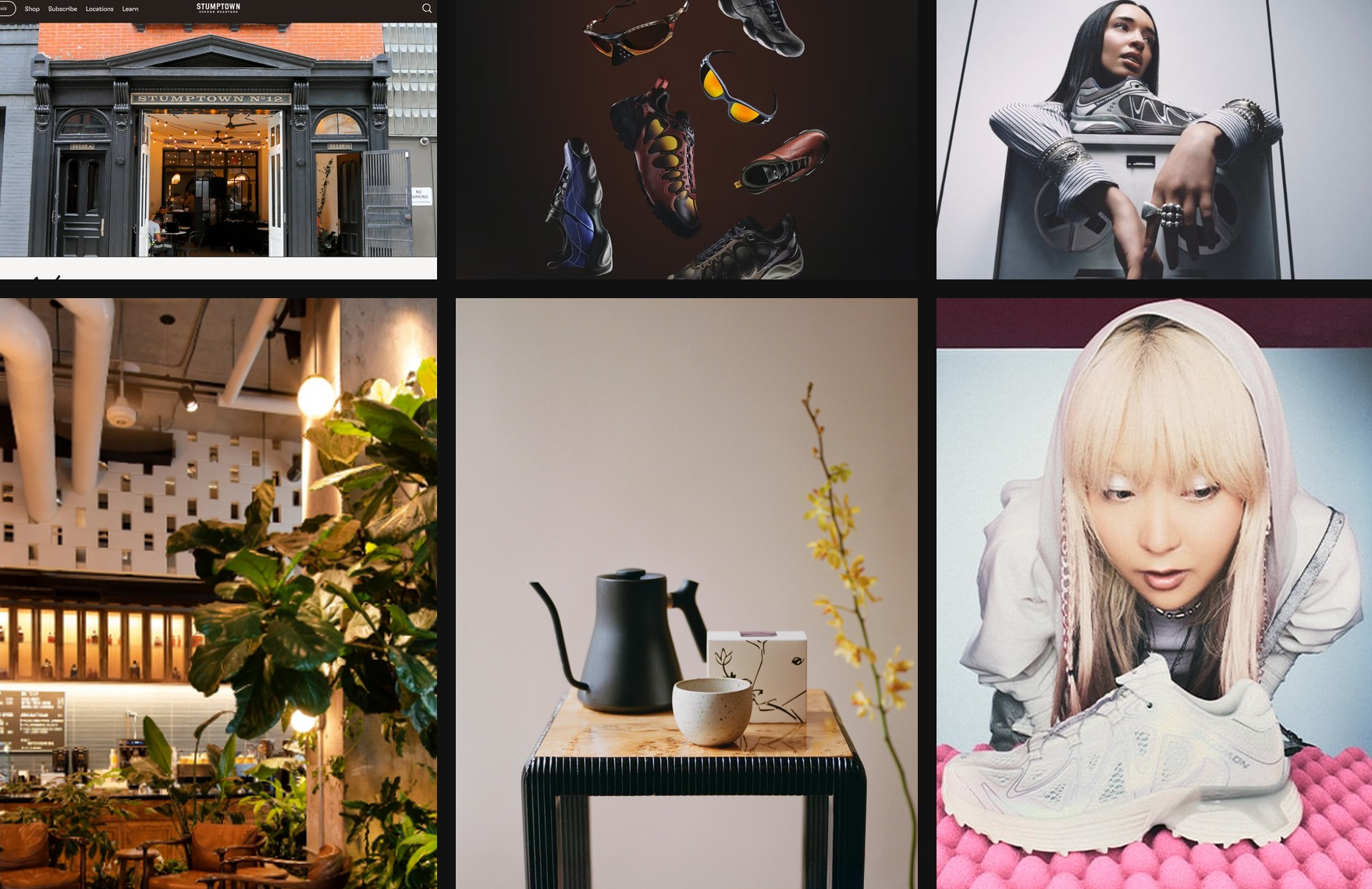
在 Codex 中由 GPT-5.4 创建的情绪板,灵感来自纽约咖啡文化与 Y2K 美学
把页面结构组织成叙事
常见营销页结构:
- Hero —— 建立身份与承诺
- Supporting imagery —— 展示场景或环境
- Product detail —— 解释产品/服务内容
- Social proof —— 建立可信度
- Final CTA —— 把兴趣转化为行动
明确要求遵循设计系统
鼓励模型在构建早期就建立清晰设计系统。先定义核心设计 token,例如 background、surface、primary text、muted text、accent,再定义字体角色如 display、headline、body、caption。这样能让模型在全应用里产出一致、可扩展的 UI 模式。
对大多数 Web 项目来说,先从 React + Tailwind 这类熟悉技术栈起步通常效果很好。GPT-5.4 在这些工具上的表现尤其强,能更快迭代到打磨完善的结果。
动效和分层 UI 会带来复杂性,特别是 fixed/floating 元素与主内容互相影响时。做动画、覆盖层或装饰层时,最好加入“安全布局”指导,例如:
Keep fixed or floating UI elements from overlapping text, buttons, or other key content across screen sizes. Place them in safe areas, behind primary content where appropriate, and maintain sufficient spacing.
适度降低推理强度
对简单网站来说,推理越多不一定越好。实践里,低和中等推理等级常常能得到更好的前端结果:模型更快、更聚焦,也更不容易过度思考;而在更有野心的设计任务中,你仍可再把推理等级调高。
让设计扎根于真实内容
给模型真实文案、产品上下文或清晰项目目标,是提升前端结果最简单的方法之一。这些上下文会帮助它选择更合适的网站结构、形成更清楚的分区叙事,并写出更可信的信息,而不是退回到通用占位模板。
用 Frontend Skill 把这些做法串起来
为了帮助大家在通用前端任务里更好发挥 GPT-5.4,我们也准备了专门的 frontend-skill(见下方)。它会在结构、审美和交互模式上给模型更强引导,让产出默认就更精致、更有意图、也更“悦人”。
Frontend Skill
---
name: frontend-skill
description: Use when the task asks for a visually strong landing page, website, app, prototype, demo, or game UI. This skill enforces restrained composition, image-led hierarchy, cohesive content structure, and tasteful motion while avoiding generic cards, weak branding, and UI clutter.
---

# Frontend skill

Use this skill when the quality of the work depends on art direction, hierarchy, restraint, imagery, and motion rather than component count.

Goal: ship interfaces that feel deliberate, premium, and current. Default toward award-level composition: one big idea, strong imagery, sparse copy, rigorous spacing, and a small number of memorable motions.

## Working Model

Before building, write three things:

- visual thesis: one sentence describing mood, material, and energy
- content plan: hero, support, detail, final CTA
- interaction thesis: 2-3 motion ideas that change the feel of the page

Each section gets one job, one dominant visual idea, and one primary takeaway or action.

## Beautiful Defaults

- Start with composition, not components.
- Prefer a full-bleed hero or full-canvas visual anchor.
- Make the brand or product name the loudest text.
- Keep copy short enough to scan in seconds.
- Use whitespace, alignment, scale, cropping, and contrast before adding chrome.
- Limit the system: two typefaces max, one accent color by default.
- Default to cardless layouts. Use sections, columns, dividers, lists, and media blocks instead.
- Treat the first viewport as a poster, not a document.

## Landing Pages

Default sequence:

1. Hero: brand or product, promise, CTA, and one dominant visual
2. Support: one concrete feature, offer, or proof point
3. Detail: atmosphere, workflow, product depth, or story
4. Final CTA: convert, start, visit, or contact

Hero rules:

- One composition only.
- Full-bleed image or dominant visual plane.
- Canonical full-bleed rule: on branded landing pages, the hero itself must run edge-to-edge with no inherited page gutters, framed container, or shared max-width; constrain only the inner text/action column.
- Brand first, headline second, body third, CTA fourth.
- No hero cards, stat strips, logo clouds, pill soup, or floating dashboards by default.
- Keep headlines to roughly 2-3 lines on desktop and readable in one glance on mobile.
- Keep the text column narrow and anchored to a calm area of the image.
- All text over imagery must maintain strong contrast and clear tap targets.

If the first viewport still works after removing the image, the image is too weak. If the brand disappears after hiding the nav, the hierarchy is too weak.

Viewport budget:

- If the first screen includes a sticky/fixed header, that header counts against the hero. The combined header + hero content must fit within the initial viewport at common desktop and mobile sizes.
- When using `100vh`/`100svh` heroes, subtract persistent UI chrome (`calc(100svh - header-height)`) or overlay the header instead of stacking it in normal flow.

## Apps

Default to Linear-style restraint:

- calm surface hierarchy
- strong typography and spacing
- few colors
- dense but readable information
- minimal chrome
- cards only when the card is the interaction

For app UI, organize around:

- primary workspace
- navigation
- secondary context or inspector
- one clear accent for action or state

Avoid:

- dashboard-card mosaics
- thick borders on every region
- decorative gradients behind routine product UI
- multiple competing accent colors
- ornamental icons that do not improve scanning

If a panel can become plain layout without losing meaning, remove the card treatment.

## Imagery

Imagery must do narrative work.

- Use at least one strong, real-looking image for brands, venues, editorial pages, and lifestyle products.
- Prefer in-situ photography over abstract gradients or fake 3D objects.
- Choose or crop images with a stable tonal area for text.
- Do not use images with embedded signage, logos, or typographic clutter fighting the UI.
- Do not generate images with built-in UI frames, splits, cards, or panels.
- If multiple moments are needed, use multiple images, not one collage.

The first viewport needs a real visual anchor. Decorative texture is not enough.

## Copy

- Write in product language, not design commentary.
- Let the headline carry the meaning.
- Supporting copy should usually be one short sentence.
- Cut repetition between sections.
- do not include prompt language or design commentary into the UI
- Give every section one responsibility: explain, prove, deepen, or convert.

If deleting 30 percent of the copy improves the page, keep deleting.

## Utility Copy For Product UI

When the work is a dashboard, app surface, admin tool, or operational workspace, default to utility copy over marketing copy.

- Prioritize orientation, status, and action over promise, mood, or brand voice.
- Start with the working surface itself: KPIs, charts, filters, tables, status, or task context. Do not introduce a hero section unless the user explicitly asks for one.
- Section headings should say what the area is or what the user can do there.
- Good: "Selected KPIs", "Plan status", "Search metrics", "Top segments", "Last sync".
- Avoid aspirational hero lines, metaphors, campaign-style language, and executive-summary banners on product surfaces unless specifically requested.
- Supporting text should explain scope, behavior, freshness, or decision value in one sentence.
- If a sentence could appear in a homepage hero or ad, rewrite it until it sounds like product UI.
- If a section does not help someone operate, monitor, or decide, remove it.
- Litmus check: if an operator scans only headings, labels, and numbers, can they understand the page immediately?

## Motion

Use motion to create presence and hierarchy, not noise.

Ship at least 2-3 intentional motions for visually led work:

- one entrance sequence in the hero
- one scroll-linked, sticky, or depth effect
- one hover, reveal, or layout transition that sharpens affordance

Prefer Framer Motion when available for:

- section reveals
- shared layout transitions
- scroll-linked opacity, translate, or scale shifts
- sticky storytelling
- carousels that advance narrative, not just fill space
- menus, drawers, and modal presence effects

Motion rules:

- noticeable in a quick recording
- smooth on mobile
- fast and restrained
- consistent across the page
- removed if ornamental only

## Hard Rules

- No cards by default.
- No hero cards by default.
- No boxed or center-column hero when the brief calls for full bleed.
- No more than one dominant idea per section.
- No section should need many tiny UI devices to explain itself.
- No headline should overpower the brand on branded pages.
- No filler copy.
- No split-screen hero unless text sits on a calm, unified side.
- No more than two typefaces without a clear reason.
- No more than one accent color unless the product already has a strong system.

## Reject These Failures

- Generic SaaS card grid as the first impression
- Beautiful image with weak brand presence
- Strong headline with no clear action
- Busy imagery behind text
- Sections that repeat the same mood statement
- Carousel with no narrative purpose
- App UI made of stacked cards instead of layout

## Litmus Checks

- Is the brand or product unmistakable in the first screen?
- Is there one strong visual anchor?
- Can the page be understood by scanning headlines only?
- Does each section have one job?
- Are cards actually necessary?
- Does motion improve hierarchy or atmosphere?
- Would the design still feel premium if all decorative shadows were removed?
在 Codex 应用里运行下面命令即可安装 frontend-skill:
$skill-installer frontend-skill
下面是借助 Frontend Design skill 生成的一些网站示例。
落地页
游戏
仪表盘
关键结论
当提示词里包含清晰的设计约束、视觉参考、结构化叙事和明确设计系统时,GPT-5.4 能生成高质量前端界面。
希望这些技巧能帮助你做出更有辨识度、设计更成熟的应用。